Wednesday, 15 July 2026

Planetcrawl using 3D viewer for Traveller style maps (computer, tablet or smartphone)

 If you have been on this blog in the past, you have certainly noticed that I had always wished that it was possible to view and manipulate the Traveller game planetary maps in a 3D format.

The problems were, first to be able to put the maps on a 3D object (dodecahedron, or even better a sphere).
For a time, I was able to do this with Sketchup, but its transformation into a subscription cash cow and an online app made it quite impractical...

The second one was the necessity to have an easy viewer for the players to manipulate the map. Here again, the existence of a simple Sketchup viewer was a solution, which also disappeared...
But now, I have been able to make a viewer which is quite easy to use. You just load a planet map into it, and you have the 3D view to look at. 

It is a PWA app, which means that it can run in your browser on your phone, tablet or computer; or that you can download and run it offline. It is free, of course...
You'll find a video which explains all here :


And the link to the PWA app is in its description (with links to blank maps and some ressources).

Have fun !

Saturday, 28 February 2026

Dragonbane tokens and standees

 Here is a new video about playing on VTT in a sideway AI theatre way...

This one is about the Dragonbane RPG, but it also showcase standees and a new VTT really cool app... which I recommend, other VTTs should work, but are probably difficulty overkill. ICVTT that I used until now should still be a great choice, but RPG Map has a few features more useful for the kind of games I play (1 to 1 import of assets, turning maps into isometric ones, scale that can be set with numbers instead of eyeballing...).


Wednesday, 31 December 2025

Orcs for sideway roleplaying battlemaps

Using movable scenery parts extends the sideway roleplaying battlemap in depth and gives more options to the characters. Here is a full display of the results.

All the assets that appear in the video can be downloaded if you want to play the game. A always, I recommend using a simple VTT program like ICVTT, other VTTs should work, but are probably difficulty overkill.


Saturday, 29 November 2025

Variant Elemental fillable character sheets for online gaming

Some weeks ago, I posted, here on the blog,  character sheets that could be used with ELEMENTAL roleplaying rules.

They are intended to be used in online gaming, but there is no reason they could not be used otherwise.

 They are designed to be easily modified to include an illustration of your character.

The charsheets presented then were the english version, but here are the french versions if needed.

PDF Elemental Charsheet in French

ODT Elemental Charsheet in French

But, Elemental being an universal set of rules, other charsheet styles could be prefered depending on the setting of the game.

Here is one style that I use for fantasy games:


PDF Elemental fantasy Charsheet in English

ODT Elemental fantasy Charsheet in English

PDF Elemental fantasy Charsheet in French

ODT Elemental fantasy Charsheet in French


And here is one charsheet in Dark style:


PDF Elemental dark Charsheet in English

ODT Elemental dark Charsheet in English

PDF Elemental dark Charsheet in French

ODT Elemental dark Charsheet in French


The pdf files can be used immediately but they don't have a character illustration; the odt files are intended to let you insert a character portrait and then export in pdf.

The detailed explanations to use the charsheets are in the previous post

Wednesday, 12 November 2025

A return to the Delian Tomb

 I wanted to present a short, well known, fantasy scenario, adapted to be played using the sideway theatrical view I have developed, using AI assets. 

And which scenario could be more appropriate than the Delian Tomb, created by Matt Colville and serendipity ?

So, here it is. All the assets that appear in the video can be downloaded if you want to play the game. A always, I recommend using a simple VTT program like ICVTT, but other VTTs should work, but are probably difficulty overkill.


Saturday, 18 October 2025

Elemental fillable character sheet for online gaming

When playing online, I generally use ICVTT or similar simples VTTs, using paper and pens for any information that I want to keep on hand. Some players seem to prefer to have their character sheet on the screen, so, I generally make some fillable character sheets that they can use alongside the program, in another tab.

I have recently discovered Elemental, a universal RPG with a balance of detail and simplicity on the spot for what I want for scenarios for which I do not want to learn new rules system, or for scenarios using a system I do not like. 

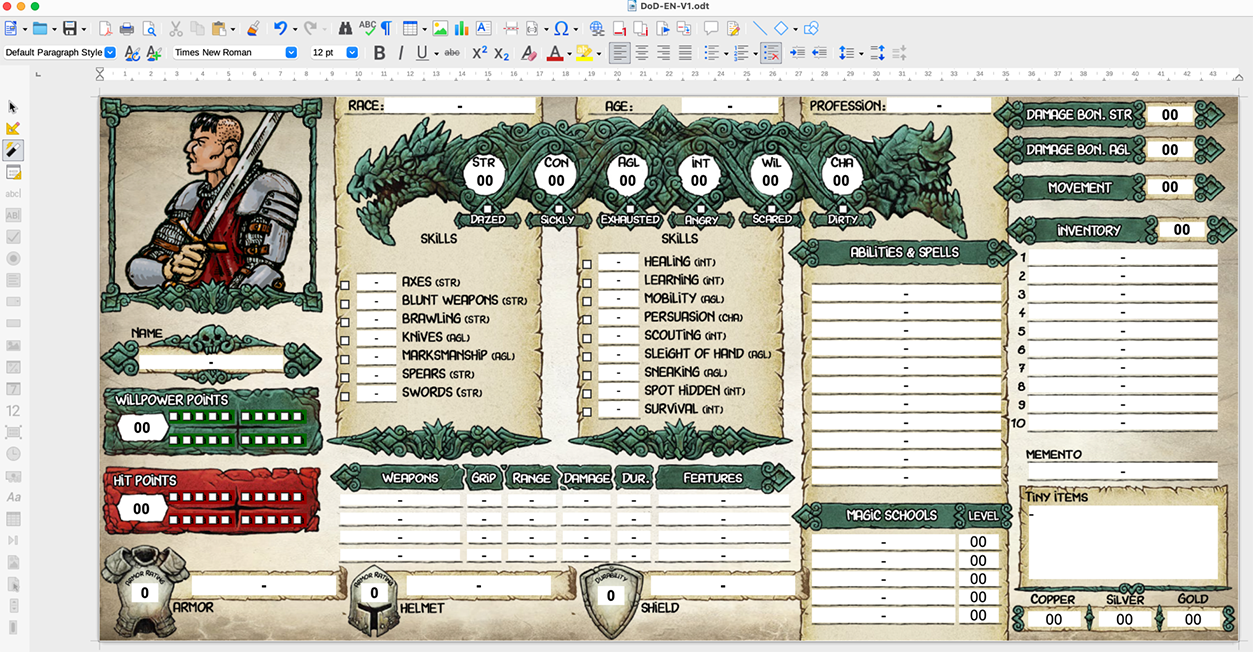
So, I made some charsheets. Here is how the result looks like. Read further to find the files for your own use.

There are two ways to use those files:

- simply open the pdf file directly in your browser (I use Chrome) and fill it, noting any changes during play and saving the result at the end of the session (don't forget to save).

- or, if you want to replace the illustration by the portrait of the character, you can open the odt file with LibreOffice or OpenOffice and modify the image before exporting the pdf.

Nothing complicated with few easy steps to follow. Here is how to do that:

1- Simple PDF charsheets, without illustrations: open and use


This is a no-brainer. You open the pdf file (with Chrome or any other program that let you modify and save modifications to a pdf file).
If you are using an online VTT in a browser (like ICVTT or Owlbear Rodeo...), you can open it in a tab alongside your VTT display. 


2. Charsheets with character illustration, open the ODT file and export to PDF


From that image, you can see that there is a space for an illustration of the character, which means that there is an image field in the odt form (obviously).

To fill that image field with an image of your choice (more or less square images are going to work best, other proportions will work though).

Open the odt file with Libre Office :


- odt file of the charsheet in Libre Office -

Check that you are not in design mode (Form Menu > Design Mode):


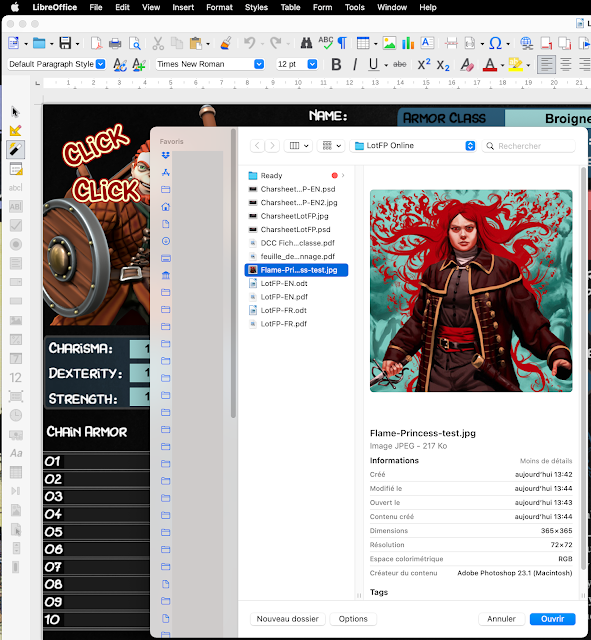
Double click on the illustration field and choose an illustration, ideally more or less square (to avoid empty space padding the image, but it will work with any proportions of image).


Export as pdf form (File > Export as PDF):

In the PDF option window that opens itself, verify that the button "Create PDF Form" is checked


And that's it. If you open the pdf form in a tab alongside your VTT page, you have a charsheet as accessible as those imbedded in other VTTs.


I hope you'll find those files useful. Let me know if there is anything wrong or unclear.

Happy gaming.


Sunday, 21 September 2025


A review of the old Traveller scenario Uragyad'n of the seven pillars.

I have some very fond memories of it. And some nostalgia issues. 

I made a lot of sideway tokens and background battlemaps to play it. I pushed the style clearly into pulps or dieselpunk atmosphere, because of the Lawrence of Arabia association.

Anyway, you can download all the assets that I produced (as usual: IA generation, Photoshop modifications and export). You'll find a link in the description of the review.

Maybe add some battlemaps turned into isometric, and you'll have more assets to play than most gamemasters are generally preparing.

I recommend the use of the ICVTT  to play. 

Those VTTs like Foundry are too cumbersome (Foundry particularly which expect you to have "setting the VTT right" as your hobby instead of roleplaying).

Whilst I recommended Owlbear Rodeo in the past, it has succumbed to the features bloat that programmers seem incapable to resist (not to mention the obligation of using their cloud to store your assets for playing, instead of your hard drive, limiting what is available during the game), a sad demise indeed for what was the finest VTT at one time in the past. 

I am more ambivalent about Roll20, which has the fine feature of the rollable table token, but still has not understood that when you import a token, it should keep its proportions (or even size) instead of being squashed in a square. It is also a bloated VTT, but most of that can be simply ignored (which makes it better than Foundry).

Wednesday, 9 July 2025


Lots of people are using Artificial Intelligence to enhance their Tabletop Roleplaying experience ! But they tend to limit its use to illustrations.

Combining assets made by Artificial Intelligence programs with Virtual Tabletop Applications can make a tremendous boost to games. And not online, but mostly in face to face sessions !

Rules do not matter, it works for every atmosphere by choosing an appropriate style. Have a look at all the exemples in the video !

Sunday, 7 April 2024

Dragonbane, fillable character sheets for online gaming (final edition, not test drive rules).

When playing online, I generally use Runehammer VTT, Owlbear Rodeo VTT, or similar simples VTTs, using paper and pens for any information that I want to keep on hand. Some players seem to prefer to have their character sheet on the screen, so, I generally make some fillable character sheets that they can use alongside the program, in another tab.

I had backed the test drive rules of Dragonbane and they really look to be right up my alley in style and complexity. When the final edition was released, I was a little disappointed by the differences from the test drive rules and let it down for a moment. I have gone back tot the rules and found that I could live with those changes (except maybe the rest rules, which have a quite classical problem, but that's a discussion for another day and easily solved anyway). 

So, I decided to remake the charsheets I made for the test drive rules, but this time adapted for the final edition. The user guidances are, of course the same as those for the test drive, but they are repeated here for ease of use.

Finally, I have only the official character sheet in english. I have translated it in french myself for the french version, but I could have to remake it later if the french edition translates some things differently.

Here is how the result looks like. Read further to find the files for your own use.


There are three ways to use those files:

- simply open the pdf file directly in your browser (I use Chrome) and fill it, noting any changes during play and saving the result at the end of the session.

- or, if you want to replace the illustration by the portrait of the character, you can open the odt file with LibreOffice or OpenOffice and modify the image before exporting the pdf.

- and, finally, if you want to display an illustration set inside a border with the same style as those in the Dragonbane rules, you can prepare it with just a few clicks in GIMP or Photoshop.

Nothing complicated with those few steps to follow. Here is how to do that:


1- Simple PDF charsheets, without illustrations: open and use


This is a no-brainer. You open the pdf file (with Chrome or any other program that let you modify and save modifications to a pdf file).


2. Charsheets with character illustration, open the ODT file and export to PDF


From that image, you can see that there is a space for an illustration of the character, which means that there is an image field in the odt form (obviously).

To fill that image field with an image of your choice (more or less square images are going to work best), open the odt file:

- odt file of the charsheet in Libre Office -

Check that you are not in design mode (Form Menu > Design Mode):


Double click on the illustration field and choose an illustration, ideally more or less square (to avoid empty space padding the image, but it will work with any proportions of image).


Export as pdf form (File > Export as PDF):


In the PDF option window that opens itself, verify that the button "Create PDF Form" is checked.


And that's it. If you open the pdf form in a tab alongside your VTT page, you have a charsheet as accessible as those imbedded in other online VTTs.


3. Placing the character illustration into a frame with the same style as the Character Sheet


If you want to take the Dragonbane style appearance a little bit further, you can make the illustration of the character in the same style as the rest of the character sheet.

To do that, you'll have to open a PSD file containing the frame with GIMP or Photoshop and export the portrait from there. I'll show how to do it with GIMP, because I assume that if you pay a monthly fee for Photoshop, you already know how to use it (and the steps are the same anyway).

Step 1: Open the PSD DoD-Portrait file with GIMP:


Step 2: Open the image of your character and select/copy it
File > Open
Select > All
Copy


Step 3: Go to DoD-Portrait window that you have already opened, select the -Place Image Here- layer and paste.


You can resize and/or move the image of the character within the frame with the transformation tools:


Step 4: when you are satisfied with the result, just export as a jpg (to export as a jpg, you have to manually write the jpg extension in the name of the exported file).


And that's all, you can place this image into your character sheet as we have seen before.


I hope you'll find those files useful. Let me know if there is anything wrong or unclear.

Happy gaming.

Sunday, 9 October 2022

Dragonbane/Drakar och Demoner fillable pdf character sheets (swedish, english and french)

This blog post was made for the test rules released during the Kickstarter Dragon bane campaign. The character sheet of the finale release is different. This post is then obsolete and is replaced by a newer one taking into account the new modified character sheet.

You'll find it here:

https://toybox-sw.blogspot.com/2024/04/dragonbane-fillable-character-sheets.html

When playing online, I generally use Owlbear Rodeo VTT, Runehammer VTT or similar simples VTTs, using paper and pens for any information that I want to keep on hand. Some players seem to prefer to have their character sheet on the screen, so, I generally make some fillable character sheets that they can use alongside the program, in another tab.

I have recently backed the test drive rules of Dragonbane and they really look to be right up my alley in style and complexity (except maybe the rest rules, which are quite classical, but that's a discussion for another day and easily solved anyway).

So, I decided to make some charsheets, but contrary to my usual black background, I used graphic elements from the official character sheet, because I found them so gorgeous. 

Here is how the result looks like. Read further to find the files for your own use (files provided with the authorisation from Free League, of course).


There are three ways to use those files:

- simply open the pdf file directly in your browser (I use Chrome) and fill it, noting any changes during play and saving the result at the end of the session.

- or, if you want to replace the illustration by the portrait of the character, you can open the odt file with LibreOffice or OpenOffice and modify the image before exporting the pdf.

- and, finally, if you want to display an illustration set inside a border with the same style as those in the Dragonbane rules, you can prepare it with just a few clicks in GIMP or Photoshop.

Nothing complicated with those few steps to follow. Here is how to do that:


1- Simple PDF charsheets, without illustrations: open and use


This is a no-brainer. You open the pdf file (with Chrome or any other program that lets you modify and save modifications to a pdf file).


2. Charsheets with character illustration, open the ODT file and export to PDF


From that image, you can see that there is a space for an illustration of the character, which means that there is an image field in the odt form (obviously).

To fill that image field with an image of your choice (more or less square images are going to work best), open the odt file:

- odt file of the charsheet in Libre Office -

Check that you are not in design mode (Form Menu > Design Mode):


Double click on the illustration field and choose an illustration, ideally more or less square (to avoid empty space padding the image, but it will work with any proportions of image).


Export as pdf form (File > Export as PDF):


In the PDF option window that opens itself, verify that the button "Create PDF Form" is checked.

And that's it. If you open the pdf form in a tab alongside your VTT page, you have a charsheet as accessible as those imbedded in other online VTTs.


3. Placing the character illustration into a frame with the same style as the Character Sheet


If you want to take the Dragonbane style appearance a little bit further, you can make the illustration of the character in the same style as the rest of the character sheet.

To do that, you'll have to open a PSD file containing the frame with GIMP or Photoshop and export the portrait from there. I'll show how to do it with GIMP, because I assume that if you pay a monthly fee for Photoshop, you already know how to use it (and the steps are the same anyway).

Step 1: Open the PSD DoD-Portrait file with GIMP:


Step 2: Open the image of your character and select/copy it
File > Open
Select > All
Copy


Step 3: Go to DoD-Portrait window that you have already opened, select the -Place Image Here- layer and paste.


You can resize and/or move the image of the character within the frame with the transformation tools:


Step 4: when you are satisfied with the result, just export as a jpg (to export as a jpg, you have to manually write the jpg extension in the name of the exported file).


And that's all, you can place this image into your character sheet as we have seen before.


I hope you'll find those files useful. Let me know if there is anything wrong or unclear.

Happy gaming.

Saturday, 19 February 2022

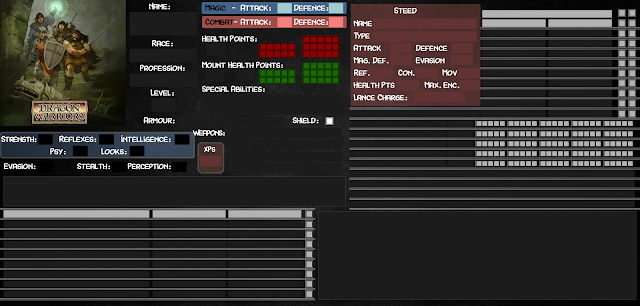
Online character sheets for Dragon Warriors - Fiches de Personnages online pour Dragon Warriors


When playing online, I generally use Owlbear Rodeo (actually the very best online VTT) , using paper and pens for any information that I want to keep on hand. Some players seem to prefer to have their character sheet on the screen, so, I have made some for the different classes of characters in Dragon Warriors.

Lorsque je joue en ligne, j'utilise généralement Owlbear Rodeo (qui est actuellement et de loin le meilleur VTT) , et, j'utilise du papier et un bic pour les notes que je veux garder sous la main. Certains joueurs préfèrent cependant avoir leur fiche de personnage affichée sur leur écran, aussi, j'en ai réalisé pour les différentes classes de personnage de Dragon Warriors.


There are two ways to use those files:
- open the pdf file directly in your browser (I use Chrome) 
- if you want to replace the illustration by the portrait of the character, you just have to open the odt file with LibreOffice or OpenOffice and modify the image before exporting the pdf.

Il est possible de les utiliser de deux façons:
- ouvrir le fichier en pdf directement dans un browser (j'utilise Chrome) 
- si vous désirez personnaliser l'illustration avec un portrait du personnage, il suffit d'ouvrir le fichier odt avec LibreOffice ou OpenOffice et de modifier l'image avant d'exporter la fiche en pdf.


Friday, 11 February 2022

Using Custom Online Character Sheets

There is, of course, no obligation to use digital character sheets whilst playing online.

A simple sheet of paper on your desk can easily do the trick. It is certainly enough for my notes and for tracking PCs, NPCs, scenario info... but some players prefer to have their character's info on the screen, alongside the VTT display. So, why not?

Some of the most used online VTTs provide sheets that you can use within the program, more or less customizable, more or less limited and more or less available, depending on the VTT and the game played.

There are two BIG problems with those embedded sheets. The first one is that you have to fill lots of stuff on those sheets, because peoples designing them never think there is enough information on them.

The second one is that if you play one of the games for which no charsheets are provided, you are out of luck. You'll have to setup one yourself in a programming language that is generally not intuitive, and with almost no control on the look and usability of the sheet.

It can be quite frustrating, but, you don't have to use those. 

There is a far easier way to have online charsheets and in a very simple way: using simple PDF forms that you can generally find online for your favorite game, or that you can produce yourself by making a form in Open Office or Libre Office (in odt format) and export as a PDF form.

Making PDF forms is really easy: you make an image of the form you want to design. Set it as background in Open Office or Libre Office. And then place the fields you want onto it (bullets, check boxes, text, images...). Let's have a look at the result.

Here is the exemple of the charsheet I have made for Lamentations of the Flame Princess. As you can see, the page setup is in landscape format to be in the same orientation as a screen.

And there is a space for an illustration of the character, which means that there is an image field in the odt form (obviously).

To fill it, open the odt file (sample files are found at the end of this post to let you try it). Note that if you make charsheets where there is no illustrations to place, you can directly use the PDF in your browser without going through the odt first, but it is less funny...).

- odt file of the charsheet in Libre Office -

Check that you are not in design mode.


Double click on the illustration field and choose an illustration, ideally more or less square (to avoid black areas padding the image, but it will work with any proportions of image).

Export as pdf form (check that form is active).

And that's it. If you open the pdf form in a tab alongside your VTT page (on Owlbear Rodeo, preferably, it is the best one available -and free- at the moment), you have a charsheet as accessible as those imbedded in other online VTTs, but much more flexible, easier to produce, and adapted to YOUR game and tastes. And if you need special sheets to add for certain class of characters (sheets with lists of spells, for exemple...), you can always make one that the player can open in another tab.

Indeed, any information that a player may want to have available can be turned into a pdf, fillable or not, that can be opened in a different tab. The difference here, with the sheets offered by VTTs like Roll20 or Foundry, or .... is that here you only have what you want, in the way you want, and each player can have his own setting without having to use a predefined one.

CAVEAT: When you have finished using the form in your browser, don't forget to save it WITH the changes. If you just close it, they will be lost. It is probably a good idea to save regularly your progresses (yes, we all know that and still...).

If you don't want to go through Open Office or Libre Office to export PDF forms customized with an illustration of the character, you can just do it once and place the logo or the cover of the game as an illustration. And then use directly copies of the same pdf for every player.

But, above all, remember: it is not because something can be turned into a digital format that it must be, and papers and pencils are still the most versatile way to record information. But, of course, YMMV....

If you want to experiment a little, here are the LotFP sheets (english and french) in odt, and the samples in pdf that you can open directly and fill in your browser.