Friday, 1 May 2015

Empire Galactique & Mega - Nostalgie intersidérale et paratemporelle

Empire Galactique est un jeu de rôle de science-fiction créé par François Nedelec, publié chez Robert Laffont en 1984.

C'est, à mon avis, un des meilleurs jeux de space opera a avoir jamais existé; il est à la fois simple, cohérent et suffisamment ouvert pour permettre aux maitres du jeu d'intégrer sans problèmes toutes les aventures qu'ils pourraient imaginer.
De plus, il était illustré de superbes dessins de Manchu qui auraient justifié à eux seuls l'achat des règles.

Le jeu est maintenant disponible gratuitement en téléchargement (légal, avec la bénédiction de l'auteur) sur le site Empire Galactique de Narbeuh (malheureusement exclusivement dans les règles de la seconde édition), et l'on aurait pu espérer un regain d'intérêt, au moins sur le net, pour ce superbe jeu, handicapé autrefois par une politique éditoriale affligeante (un changement de système inutile en plein milieu de la publication de la seconde partie du jeu -les encyclopédies galactiques- et un saccage complet des superbes illustrations de Manchu dans la seconde édition).
Je suis persuadé que c'est cette politique incohérente qui a sabordé le jeu, alors que les joueurs de la première heure avaient attendu longtemps dans l'espoir de voir sortir des suppléments.
C'est en tout cas à ce moment que j'ai abandonné, assez dégoûté du passage inutile à des règles au symbolisme abscons et je me souviens n'avoir pas été le seul.

Si, dans le futur, il était possible de mettre aussi en ligne les règles de la première édition, ce serait le nirvana. Ce qui, hélas, ne semble pas envisagé. Dommage, à nouveau une occasion ratée. Ca semble être un peu le destin d'Empire Galactique.

Heureusement, dans la version de la deuxième édition proposée en téléchargement, les illustrations de Manchu ont été préservées, ce qui, au moins, compense un peu le regret de ne pas disposer du système de jeu initial, plus simple, plus souple et plus cohérent.


Dès lors, si vous voulez découvrir ce monument, je vous conseillerais lourdement de plutôt vous procurer un exemplaire des règles dans la première édition. Il en apparait régulièrement à des prix raisonnables sur les sites de ventes en ligne (particulièrement eBay, mais aussi parfois Amazon ou autres).

Les encyclopédies galactiques sont bien plus difficiles à trouver (et souvent à des prix prohibitifs), mais là, il est possible de les récupérer sur le site Empire Galactique cité plus haut. Le fait qu'elles soient dans une version destinée à la seconde édition n'est pas aussi gênant que pour les règles, la version originale des encyclopédies étant, déjà à l'époque, un foutoir mélangeant les deux systèmes. Gardez le contexte et adaptez les règles en fonction de celles de la première édition.

J'ai d'ailleurs complété la page reprenant la liste des talents dans les règles de base (première édition), afin d'y intégrer les nouveaux talents proposés par l'encyclopédie galactique. J'ai suivi la numérotation des règles de base, ce qui permet de donner la liste des talents sous forme de chiffres avec le bonus de talent en exposant (comme dans l'illustration ci-contre).
La page est au format pdf et peut se télécharger ICI. J'ai toujours apprécié la possibilité de donner les caractéristiques de jeu d'un personnage ou d'une planète ou d'une race d'aliens, etc sous la forme d'une simple ligne de données.

Vous trouverez ICI, une fiche de personnage. Comme toutes les fiches que je destine à l'affichage sur écran, elle est au format paysage. Elle peut évidemment aussi être imprimée.

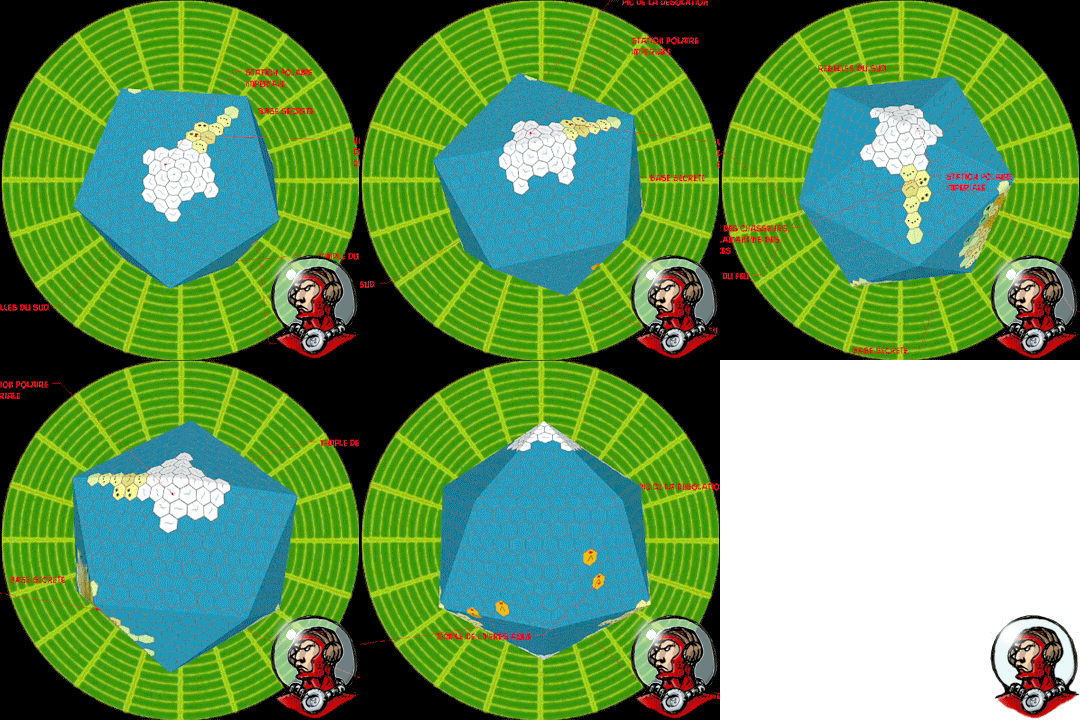
Je suppose que la plupart d'entre vous doivent déjà disposer de leur propre version, mais pour ceux qui seraient intéressés, voici une série de documents vierges permettant de réaliser des cartes de secteurs galactiques et de planètes. Une table a été incluse, permettant d'adapter la taille des représentation de systèmes planétaires aux règles de création de planètes reprises dans Empire Galactique.La surface planétaire est représentée sous la forme de la projection d'un icosaèdre (un dé à 20 faces, quoi...); en utilisant Sketchup, il vous serait possible de présenter à vos joueurs un modèle en 3D de la planète qu'ils désirent étudier.
Le même post sur le blog discute de la possibilité de jouer en Space Opera sous la forme d'une campagne de planetcrawl. Empire Galactique s'y prêterait particulièrement bien et je serais curieux de connaitre vos avis à ce sujet.

Empire Galactique, avec les années passées et la nostalgie des souvenirs, est peu à peu devenu un de ces jeux qui ne s'oublient pas et survivent sur internet et il était normal que des sites apparaissent pour s'y consacrer. L'utilisation de vos capacités psioniques de Google-Fu devrait vous permettre d'en localiser quelques uns (parfois actifs, parfois des astres morts).


Il est amusant de noter que certains éléments d'Empire Galactique ont été repris quelques années plus tard dans le jeu MEGA (le Triche-Lumière). Non pas que celui-ci se situe dans l'univers décrit dans le jeu, mais un peu à titre de clin d'oeil.Ce qui, d'ailleurs, ouvre des perspectives intéressantes.

Il serait, en effet, assez facile de jouer une campagne MEGA en utilisant les règles d'Empire Galactique, ce qui aurait le double avantage de faciliter la mise en place de scénarios dans le quotidien des Megas (devenus des serviteurs d'une assemblée galactique remplaçant l'empereur), et d'éviter le recours aux règles assez lourdes du système MEGA, qui m'ont toujours semblé assez indigestes (à la différence du background qui est sans doute le meilleur prétexte qui ait jamais été inventé pour jouer dans une série illimitée d'univers et d'ambiances), ce qui est, bien entendu une appréciation toute subjective et toute personnelle..


Mega en tant que jeu a connu trois versions.
De la première, la plus simple (et la plus fun à mon avis), à la troisième, la plus complexe (et finalement la plus restrictive à force de vouloir tout expliquer).
Pour récupérer le contexte, elles feront toutes l'affaire. Surtout la première, dans la mesure où elle vous laissera plus de latitude. D'autant que le background de Mega étant un prétexte pour y accrocher des scénarios, les rationalisations élaborées sont probablement plus nuisibles qu'utiles.

Les scénarios de la première et deuxième édition sont les plus intéressants à mon sens, dans la mesure où il s'agit de scénarios courts, situés dans des univers différents, et montrant clairement les possibilités du concept.
Divers scénarios ont aussi été publiés dans Casus Belli autrefois, ce qui ne nous rajeunit pas.


L'ambiance du jeu est absolument fabuleuse et rappelle un peu, par certains points, les premières aventures de Valérian et Laureline (avant qu'il ne se retrouvent dans des arcs narratif interminables).


Mega est un univers à découvrir pour ceux qui ne le connaissent pas encore (même si je vous conseille d'utiliser d'autres règles, j'utilise MSPE sans aucun problème, mais il y en a plein d'autres qui pourraient faire l'affaire, Traveller ou Cepheus et leurs dérivés, par exemple...).

Et si vous avez un système de règles à utiliser, vous pouvez vous contenter de récupérer le background ICI ainsi que l'adaptation à certaines règles (évitez les versions narrativistes, ça pique aux yeux).
Je vous conseille cependant d'alléger le background, dans la mesure où il a probablement enflé au delà de ce qui est nécessaire et suffisant pour jouer. Mais évidemment YMMV.
Il existe, enfin, une petite communauté sur internet, qui continue à pratiquer le jeu MEGA et qui en a même réalisé une quatrième mouture, cependant que les auteurs d'origine ont marqué un intérêt pour ressusciter eux-même leur création (MEGA next?). L'avenir reste donc ouvert.


Saturday, 17 January 2015

The Lichway - Le Chemin des Morts (Sample Old Style battlemap)


(my player's characters from our Nightprowler campaign lost in the ruins of the Lichway)

My players have been asking for a fantasy campaign, so I decided to dust off my Nightprowler rulebook and have a try. Nightprowler is a game about thieves and other unsavory characters, something like the Thieve's Guild game from the 80's, which had a lot of scenarios. Those TG scenarios are going to form the base of the campaign as they are going to be easy to adapt.
But for the first scenario, I wanted something simple and traditional to let the players familiarize themselves with the rules. A good dungeon would be perfect for that (or tomb looting as they were called in Thieve's Guild). I did choose The Lichway, an old scenario by Albie Fiore published in White Dwarf 9. And to represent it in Maptool, I decided that an old style presentation would be appropriate.


So, you'll find the Maptool file HERE. It contains the map and the tokens. If you don't use Maptool, you can still use the contents by changing the extension to zip and extracting it normally.
You'll find the scenario on internet. HERE and HERE (french)

At first I intended to use isometric views with tokens made from Okumarts figures (I'll make a tutorial on how to change the cardboard figures into isometric tokens), but I thought that I had hit a wall with my isometric experiments. To be able to use isometric stuff with illuminations,etc... , some programming tweaks are needed in Maptool, far beyond my capacities. So, I was going to use iso views only for special places and without the advanced features (just iso tokens on iso maps). But, maybe I am wrong as there seems to be some news about iso playing on the Maptool forum. So, wait and see (and hope).


Sunday, 11 January 2015

Planetcrawl with an easier way to make 3D Traveller style world maps

THIS ARTICLE IS OBSOLETE. THERE IS NOW A FREE VIEWER TO SEE YOUR TRAVELLER STYLE MAPS ON A GLOBE. USABLE ON PHONE, TABLET AND COMPUTER.
THE NEW ARTICLE IS AVAILABLE HERE :


Some times ago, I did show a way to turn the kind of planetary maps familiar to Traveller gamers into 3D views for the enjoyment of your players.

Whilst not very complicated, it involved the cutting and pasting of every face into the model, one by one, twenty of them....
It was not a very bright solution.... It can be made in one step....Sorry.

So, here is a new way to turn your planet maps into a 3D model that your players can look around to observe the geography of their destination. But now, it can be made in less than five minutes.

Observant readers will notice that I have also modified the presentation of the result, so that now, it avoids giving the impression that planets are D20 in space but show the model as a simplified 3D representation destined to give only the pertinent information about a planet to an overburdened space crew.


PART ONE: PREPARING THE FLAT MAP
- Open the Icosahedral Worldmap Generator from Inkwell, the makers of Hexographer (free to download HERE)
- Generate or draw your map. You can generate a map or place yourself all the hexes you want. The best idea is probably to generate the map and change the parts you want to make specifically to fit your scenario. Take care to choose the number of hexes of a mapside, depending on the size of the planet. Export the map as png.
Click the image to see full size
- Open the png in GIMP (free to download HERE)
- Crop: as you can see, there is a grey area, extending around the map itself. Select the map itself with select rectangle tool and then crop to the selected area.
Click the image to see full size
- Resize: Our cropped map must be exactly 1500 x 709 pixels, so resize it to that size. Disable the automatic Keep Proportions.

- (Optional) Heal: whilst we have cropped out the exterior grey area, there are still grey triangles area between the triangle faces of our map. Those areas won't show on the 3D map, so we could keep them. Still sometimes they can appear as fine lines between faces of our 3D maps. It is easy to get rid of them to have perfect matches faces on our 3D maps. Select those grey triangle and apply the heal selection filter.
Click the image to see full size
Above is the healed view of the map. As you see, GIMP added parts where the map was plain grey. This is unimportant, because those part won't show on the 3D map. What is important is that the colors have been extended from the map boundaries, meaning that there won't be grey visible on the 3D map.

- (Optional) Add features to your map: of course, whilst you are in GIMP, you can add some special features on your maps (text or wathever).

- Export as png.

PART TWO: FROM 2D TO 3D

- Open Sketchup (download for free HERE) The free version is the one called Sketchup Make.
- Open the blank planet map (download it HERE)
- Replace the blank texture with the planet map you designed in part one. For that, do the following:

Open the texture window (bucket tool and clicking the brick on the choices on the upper part of the panel) and double click on the empty planet texture (the one with the letters) to open the panel completely.
Click the image to see full size
Go to the texture menu in the lower part of the window and choose Load. Navigate then to your planetary map and choose it. It is done.
Click the image to see full size
- (Optional) Add 3D labels to your map (like those moving around on the above animated gif)
- Save your file

Your players can now view and manipulate the map within the Sketchup viewer (freely available HERE), without any risk to modify it. Basically, they should simply click the tabs at the top of the page, but they can also use the normal sketchup manipulating tools. They can always come back to the normal views by clicking a tab anyway.

Five minutes flat for a planetary map, which means that a full subsector can be mapped in 3D in one hour. Meaning also that with just a little more work and then...

How about playing a planetcrawl or even a spacecrawl or sectorcrawl? It wouldn't be very complicated....

A few encounters tables by terrain types common on all the planets (spaceports, imperial cities,...), a few encounters tables for terrain types specific for a planet (natives cities, wilderness,..) and a few hexes with prepared places that the players are searching for or containing the stuff that every adventurers are wishing to find (a crashed spaceship, the ruins of a pre-imperial civilization, a research station which doesn't emit anymore, the hideout of the scientific madman, the secret base where the Zorgs are keeping the space Princess captive,...). Don't forget to add trading and adventures opportunities, here and there.

Try to alternate civilized, populated planets and barren unexplored ones. Keep space communications limited by light speed whilst space travel is through space wrap, meaning that if you want to know something, you'd better go and see for yourself.  Space travel should be more like pirates ocean going than 21th century communications.
Make even wrap travel slow enough to give a strong feeling of navigating among an ocean of stars separated by gulfs of blackness. 
Add misjump possibilities, just for the look on the player's face when they appear in a system swarming with Zorgs warships where nothing have been reported before.

And, of course, all this should happen on a frontier sector, where most of the universe is still mysterious and largely unexplored.

But, mostly, give the characters reasons to move and to search; either to find something or someone or solve some mysteries; and/or to flee from someone or something. This is pulps space! Have action!

First choice to use those ideas would be CLASSIC TRAVELLER (just the black books 1, 2 and 3), of course. After all they are rules that were designed to be able to play in any scifi setting. The imperial background channeled the game in another direction, but is, after all,  a later addition.

Wouldn't a game like  X-PLORERS also perfectly fit this mood? It is a wonderful old school scifi game. It shall give you all you need for the kind of campaign described above. ....  You could also use other games with the right state of mind: STAR ACE, STAR FRONTIERS, SAVAGE WORLDS TALES OF THE SPACE PRINCESSOr also, STAR EXPLORERSSTARSHIPS & SPACEMEN 1st or 2nd Edition for a Star Trek feeling, which, of course blends quite well with a planetcrawl game. Ou enfin, en français EMPIRE GALACTIQUE (la première édition seulement, la seconde ne tenant pas vraiment la route).

Now is the time for retroscifi planetcrawl. Time to dust off your Poul Anderson and Edmund Hamilton novels. Grab you blaster, fire the engines of your old trusty modified Trader smuggler spaceship and go save a Space Princess.


Sunday, 6 October 2013

Isometric Maptool

A recent posts exchanges on Maptool forum reminded me of an old idea about using Maptool using isometric maps and figures. So, I decided to try it, to see how difficult it would be. To my surprise, it was very easy, much more than I anticipated.

The first step for me, was to make an isometric tilable background, to be able to draw maps on it, for gaming situations without full maps. Having to choose a square size, I decided to go with 150 pixels across and 86 in height.

Here is the background (the markings at the midpoint of faces are there to help drawing):

Just use it as background when making a new map and you can already draw isometric maps.


Next step, was to see how difficult to turn a squared map into an isometric one of the same proportions as the background above. Really easy. You can turn any square map in an isometric one in two minutes flat. You just need a program like Photoshop or GIMP and do the following:

- Step 1: Open your map and count the numbers of squares in size. Add the height (in squares) to the width (in squares); divide by two and remember the result for later.
Here, we have (10+7)/2=8.5

- Step 2: pivot the map 45° 


- Step 3: resize. Take the number found in step 1, above. Multiply it by 150 for the width in pixels, multiply it by 86 for the height in pixels.


And... It is done. But now, we need the figures to play on it. We'll need four views of each figure, one for each direction.

Making basic figures, like standing tiles that are used in some games (I think with Pathfinder), is as easy as making them in Tokentool. Just add those four new frames to the program and drag an illustration into it (once for each view). The result can be seen here:

It is possible to make better looking figures, like cardboard standups (using cardboard standups as a base), but it requires some work in Photoshop. I'll have to make a separate tutorial about it if there is any interest. Anyway, here is how those figures look like:

There still a better solution that I intend to explore, which would be to draw directly the views in an isometric perspective, but it would need four drawings for each figures and it looks a little like overkill for a style of gaming that is not very widespread.

Now, the last thing to do is to use all this stuff in Maptool. And, that also, proved amazingly easy.

First, as there is no isometric grid available in Maptool, you need to disable the grid view and the snapping.

Secondly, we'll need a new stat, called Table that should be added in the properties.

Now, for each figure, we must make a table. The table name shall be used as the value of the Table stat we added above. You must add the four views of the figure in the table and the value in the first colums should be 1 for the view going up-left, 2 for down-left, 3 for up-right and 4 for down-right.

There are a group of macros to add, to move and turn the figures.
The eight first buttons move the figures and the four last ones change the orientation.

There is still a problem to overcome. When a figure is moved, it must be placed above or under other figures, depending on where they are on the map. There is a line in the macros that take care of that when moving the figure with the buttons. To have the same effect when dragging a figure, there is a lib:token that must be added (this command is not mine, I found it in a post by aliasmask on the Maptool forum, so, thanks aliasmask).

You'll find all of this and a few stuff to experiment in the campaign file here.

There are still two questions that I would like to ask:
Is anyone interested in this style of gaming? I can see myself making maps and figures for peoples to use in their games. But probably not if there is not much interest. For my own use, it shall be used only in very prepared games. I am mostly trying those days to reduce the amount of preparation needed before play, and it takes myself in a very different direction (but that's for another post).

Is there any chance to have Maptool next version supporting an isometric grid. This system works without problem, but being able to use snapping would be fine.

Anyway, let me know what you think, here or on the Maptool forum.


Sunday, 11 August 2013

3D Traveller style planets maps for space opera games with Hexographer and Sketchup

THIS ARTICLE IS OBSOLETE. THERE IS NOW A FREE VIEWER TO SEE YOUR TRAVELLER STYLE MAPS ON A GLOBE. USABLE ON PHONE, TABLET AND COMPUTER.
THE NEW ARTICLE IS AVAILABLE HERE :


For me, one of the most enjoyable parts of mastering a space opera game, has always been the mapping part. I have always loved the idea of making the planetary maps on the icosahedron projection that was used in RPGs since Traveller. Like that one:


(this map comes from the Hexographer free map generator, read further)

Whilst I make with great care the maps that are required for the scenario, I have always needed more maps than those. Indeed, the players are bent to wander around and, after all, one of the attraction of space opera is the possibility to travel around in an almost limitless setting.

So, I also need to be able to populate parts of the setting that are not vital for the scenario. It is quite easy as far as stats are concerned (all rulesets have generation systems for sectors, stars and planets), but it can be very time consuming if you want to map all those planets, or even some of them.

That's where Hexographer comes in. It is a simple mapping program that lets you make normal maps. And, if you have never heard about it, you should have a look, it can make your life as a GM much easier.

But it also has a setting for icosahedral maps. And what is even more interesting, it can also generate maps from a few chpices (hydrography, mountain ranges,...) which are the kind of informations that your game system and scenario has normally provided. And then it lets you customize the generated result.

But it is even better: there is a free version here that is limited to planetary maps. It should be enough for what we are speaking about here, though I would advise you to buy the full version, it is not expensive and you won't regret it: it will give you access to other mapping functions, styles,...

Anyway, download it, open it and generate a few maps, it is fun and even addictive.

But, why stop there? Why not present those maps in a 3D way? Like this one:


This is simply the map shown above turned into a 3D view.

First, you'll need Sketchup to change the flat map into a 3D model. You can download it Here.

You'll also need the empty 3D model planet. It is a Sketchup skp file with empty faces, and you can download it Here.

Now, generate a map with Hexographer, we are going to turn it into a 3D planet.

Open the empty Sketchup planet file with Sketchup, it should look like this:


Click on the A1 Tab. Click once on the face that is in front of you to select it. Then, Right-click>Texture>Modify Image Texture.

The face A1 that you were facing should open itself in the graphic program that is associated with Sketchup (if no graphic program is associated with Sketchup, go to Preferences>Applications and choose one, something like Photoshop or GIMP would be perfect).

Now, open the map of the planet you generated with Hexographer and select the part corresponding to the A1 face, paste and resize it. Flatten the layers and save.
The new image should now be visible in Sketchup on the 3D map. And as there are twenty faces, yes, you'll have to do it twenty times (from A1 to C5).

To make it easier to select the part of the map associated with a face, here is a little sketch of them:


When you are finished, just save your Sketchup model.
You, of course,  can re-open it any time and make any  changes you want, using Sketchup.

But if you prefer that your players, whilst being able to see and manipulate the 3D map, are unable to make changes, let them open it using Sketchup Viewer, available Here.

Have fun.